Visualizations
Various functions are provided to visualize information about a plate, a recipe, or a recipe step.
Plates
Substances
get_substance returns the set of all get_substances in a plate.
>>> plate.get_substance()
{<Substance: salt>, <Substance: water>}
Amounts
get_moles returns a numpy array of the amount of each substance in a plate.
>>> plate.get_moles(substance=salt, unit='umol')
array([[20., 20., 20., 20., 20., 20., 20., 20., 20., 20., 20., 20.],
       [10., 10., 10., 10., 10., 10., 10., 10., 10., 10., 10., 10.],
       [10., 10., 10., 10., 10., 10., 10., 10., 10., 10., 10., 10.],
       [10., 10., 10., 10., 10., 10., 10., 10., 10., 10., 10., 10.],
       [10., 10., 10., 10., 10., 10., 10., 10., 10., 10., 10., 10.],
       [10., 10., 10., 10., 10., 10., 10., 10., 10., 10., 10., 10.],
       [10., 10., 10., 10., 10., 10., 10., 10., 10., 10., 10., 10.],
       [10., 10., 10., 10., 10., 10., 10., 10., 10., 10., 10., 10.]])
get_volumes returns a numpy array of the volume of each or all substances in a plate.
>>> plate.get_volumes(substance=salt, unit='uL')
array([[1.2, 1.2, 1.2, 1.2, 1.2, 1.2, 1.2, 1.2, 1.2, 1.2, 1.2, 1.2],
       [0.6, 0.6, 0.6, 0.6, 0.6, 0.6, 0.6, 0.6, 0.6, 0.6, 0.6, 0.6],
       [0.6, 0.6, 0.6, 0.6, 0.6, 0.6, 0.6, 0.6, 0.6, 0.6, 0.6, 0.6],
       [0.6, 0.6, 0.6, 0.6, 0.6, 0.6, 0.6, 0.6, 0.6, 0.6, 0.6, 0.6],
       [0.6, 0.6, 0.6, 0.6, 0.6, 0.6, 0.6, 0.6, 0.6, 0.6, 0.6, 0.6],
       [0.6, 0.6, 0.6, 0.6, 0.6, 0.6, 0.6, 0.6, 0.6, 0.6, 0.6, 0.6],
       [0.6, 0.6, 0.6, 0.6, 0.6, 0.6, 0.6, 0.6, 0.6, 0.6, 0.6, 0.6],
       [0.6, 0.6, 0.6, 0.6, 0.6, 0.6, 0.6, 0.6, 0.6, 0.6, 0.6, 0.6]])
>>> plate.get_volumes(unit='uL')
array([[10.6, 10.6, 10.6, 10.6, 10.6, 10.6, 10.6, 10.6, 10.6, 10.6, 10.6, 10.6],
       [10. , 10. , 10. , 10. , 10. , 10. , 10. , 10. , 10. , 10. , 10. , 10. ],
       [10. , 10. , 10. , 10. , 10. , 10. , 10. , 10. , 10. , 10. , 10. , 10. ],
       [10. , 10. , 10. , 10. , 10. , 10. , 10. , 10. , 10. , 10. , 10. , 10. ],
       [10. , 10. , 10. , 10. , 10. , 10. , 10. , 10. , 10. , 10. , 10. , 10. ],
       [10. , 10. , 10. , 10. , 10. , 10. , 10. , 10. , 10. , 10. , 10. , 10. ],
       [10. , 10. , 10. , 10. , 10. , 10. , 10. , 10. , 10. , 10. , 10. , 10. ],
       [10. , 10. , 10. , 10. , 10. , 10. , 10. , 10. , 10. , 10. , 10. , 10. ]])
Dataframes
dataframe returns a styled pandas dataframe of the amount of each or all substance in a plate.
By default the data is returned for all substances. A specific substance can be specified.
You can specify what data you are interested in by passing the unit argument.
If you want the amount of moles of each substance in a plate, you can pass unit=’umol’.
If you want the volume of each substance in a plate, you can pass unit=’uL’.
If you want the mass of each substance in a plate, you can pass unit=’mg’.
If you want the concentration of each well in a plate with respect to a substance, you can pass unit=’M’. - In this case, a substance must be specified. - Any valid concentration unit can be used.
>>> plate.dataframe(substance=salt, unit='umol')

>>> plate.dataframe(unit='uL')
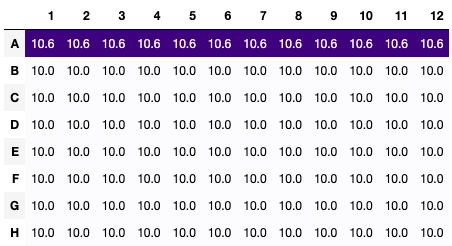
>>> plate.dataframe(substance=salt, unit='mg')
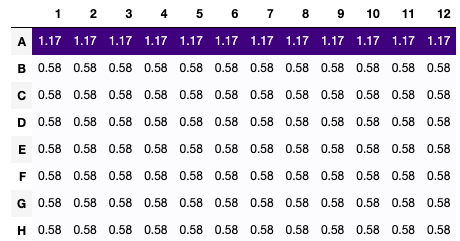
>>> plate.dataframe(substance=salt, unit='M')
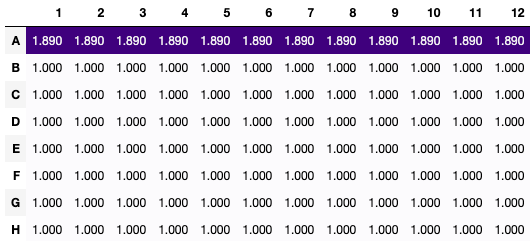
Slices
All of the above functions can be applied to a slice of a plate.
>>> plate[:2, :2].get_volumes(unit='uL')
array([[10.6, 10.6],
       [10. , 10. ]])
>>> plate[:2, :2].dataframe(unit='uL')
Recipes
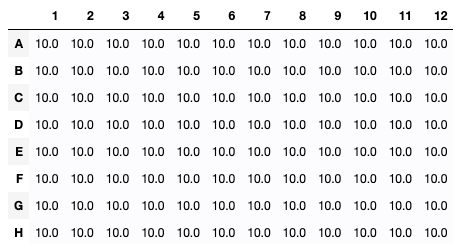
If we want to visualize what happened to a plate during part or all of a recipe, we can use the visualize method of the recipe.
The visualize method can be used to visualize the final state of a plate or the change in a plate.
The mode argument can be used to specify what we are interested in.
‘delta’ will show the change in the plate during the step.
‘final’ will show the final state of the plate after the step.
We can get information about certain substances or all substances in the plate.
‘all’ will show information about all substances in the plate.
We can specify the unit we are interested in. (moles, volume, or mass)
>>> recipe.visualize(what=plate, mode='final', unit='uL')
Recipe Steps
When a recipe is baked, all the steps are stored in the steps attribute of the recipe.
Each step has a visualize method that can be used to visualize the step, using the same arguments as the visualize method of the recipe.
>>> for i, step in enumerate(recipe.steps):
        print(f"Step: {i+1}")
        display(step)
