Introduction
PyPlate defines a set of Python-based semantics for designing and
implementing high-throughput experiments (HTE). PyPlate
aspires to define a clear, useful, and reproducible ontology for HTE.
Features
stoichiometry calculations
enumeration of solid/liquid handling steps
visualization of HTE plates
support for small and large molecules
“compile-time” checks to ensure that proposed experiments are physically reasonable
enumeration of full factorial designs or other design spaces
Core Classes
PyPlate defines all laboratory operations in terms of four key nouns:
Substance: An abstract chemical or biological entity (e.g., reagent, enzyme, solvent, etc.). This means that “water” qualifies, but not “5 mL of water” or “that beaker of water.”Container: Stores specified quantities ofSubstances in a vessel with an optional maximum volume (e.g., a 10 mL vial).Plate: A rectangular array ofContainers (e.g., a particular 96 well plate).Recipe: A list of physically reasonable instructions for transforming one set ofContainers orPlates into another.
Note
Each class is immutable. (An immutable object is one whose fields cannot be changed once it has been constructed. If a method alters an object, a copy is always returned.)
Canonical Workflow
PyPlate assists with the design and execution of high-throughput experiments.
Preparation: Create stock solutions (like substrate stocks) and initialize empty containers (like 96 well plates). (By convention, these steps should be done outside of
Recipes.)Specify Transfers: Transfer stock solutions and other raw materials to the plates by creating a
Recipe. All solid or liquid handling instructions should be defined within the context of theRecipe.Bake: Verify that the specified transfers are sensible using
recipe.bake(). If they are indeed valid, then updated containers will be generated. Oncerecipe.bake()has been called, no more instructions can be added and theRecipeis considered immutable.Visualize: The operations in each RecipeStep can be visualized using
display(step)in a Jupyter Notebook or usingstep._repr_html()in a webpage. (See Recipe Steps).
Tip: For workflows involving liquid handlers, it may be useful to define “plates” in the shape of the liquid handler’s deck. Stock solutions can be stored there. Subsequently, transfers can be made to reaction plates. This tip allows the location of stock solutions to be codified and optimized for the logistics of liquid handling.
Note
By convention, stock solutions should be prepared outside of Recipes (even though PyPlate allows Containers to be created inside or outside Recipes.)
Transfers between Containers should be done outside of Recipes, but transfers between a Container and a Plate or between Plates should be done inside a Recipe.
Quickstart Example, Explained
Below, we go through the README example in more detail. Import the necessary classes from the PyPlate module:
from pyplate import Substance, Container, Plate, Recipe
Create a liquid substance, triethylamine, with a molecular weight of 101.19 g/mol and a density of 0.726 g/mL. The default units are set in pyplate.yaml (see Configuration).
triethylamine = Substance.liquid(name="triethylamine", mol_weight=101.19, density=0.726)
Create another liquid substance, water, with a molecular weight of 18.015 g/mol and a density of 1.0 g/mL.
water = Substance.liquid(name="water", mol_weight=18.015, density=1.0)
Create a 0.05 M solution of triethylamine in water with a total quantity of 10 mL.
triethylamine_50mM = Container.create_solution(name='triethylamine 0.05 M', solute=triethylamine, solvent=water,
                                               concentration='50 mM', total_quantity='10 mL')
Create an empty 96-well plate with a maximum volume of 50 uL per well.
plate = Plate(name='plate', max_volume_per_well='50 uL')
Declare that the recipe will use the triethylamine_50mM solution and the plate.
recipe = Recipe().uses(triethylamine_50mM, plate)
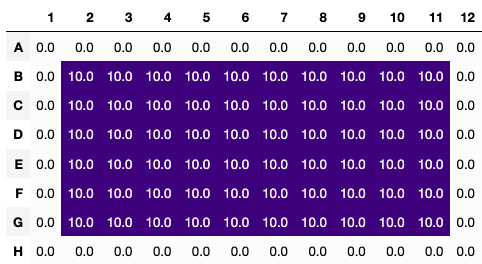
Transfer 10 uL of the triethylamine_50mM solution to the wells in the 2nd through 7th rows and the 2nd through 11th columns of the plate (all inclusive).
recipe.transfer(source=triethylamine_50mM, destination=plate[2:7, 2:11], quantity='10 uL')
Bakes the recipe, ensuring that all the steps are logically consistent and returning the results. The results are a dictionary with the names of the containers and plates as keys and the final state of the containers as values.
results = recipe.bake()
Retrieve the final state of the triethylamine_50mM solution and the plate from the results.
triethylamine_50mM = results[triethylamine_50mM.name]
plate = results[plate.name]
Get a stylized dataframe of the volume in each well of plate in uL.
recipe.visualize(what=plate, mode='final', unit='uL', timeframe='all')