Locations on a Plate and slices
PyPlate follows the pandas convention of having both integer- and
label-based indices for referencing wells in Plates.
When row or column specifiers are provided as integers, they are assumed to be integer indices (1, 2, 3, …).
Integer indices are 1-based, meaning that the first row or column is referred to as 1, not 0.
When specifiers are provided as strings, they are assumed to be label indices (“A”, “B”, “C”, …).
By default, rows in plates are given alphabetical labels “A”, “B”, “C”, and columns in plates are given numerical labels “1”, “2”, “3”.
However, rows and columns are always given integer indices 1, 2, 3, ….
Here are some ways to refer to a specific well:
String Method:
“A:1”Tuple Method:
(‘A’, 1)
Note
Colons (‘:’) within strings are used to separate row and column labels. This does not denote slicing.
Here are some alternate ways to refer to well B3:
|
|
|
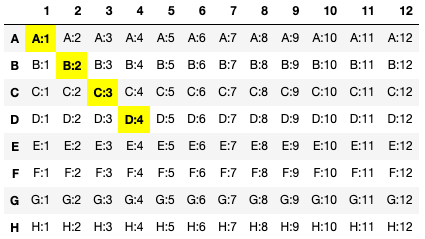
You can refer to multiple wells as a list:
plate[[('A', 1), ('B', 2), ('C', 3), 'D:4']] or plate[['A:1, 'B:2', 'C:3', 'D:4']]
Slice Notation
To get a range of rows, you can use the following syntax:
plate['A':'C']will return rows 1, 2, and 3 (‘A’, ‘B’, and ‘C’).plate[1:3]will return rows 1, 2, and 3.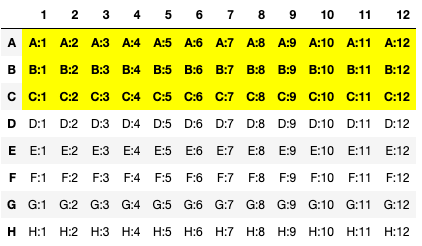
plate['D':]will return rows 4, 5, 6 … to the end of the plate.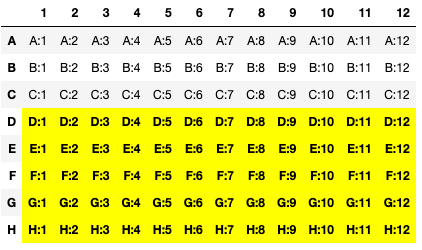
To get a range of columns, you can use the following syntax:
plate[:, '1':'3']will return columns 1, 2, and 3 (‘1’, ‘2’, and ‘3’).plate[:, 1:3]will return columns 1, 2, 3.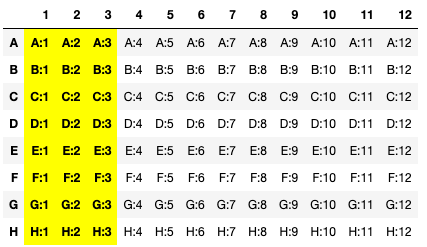
plate[:, '4':]will return columns 4, 5, 6 … to the end of the plate.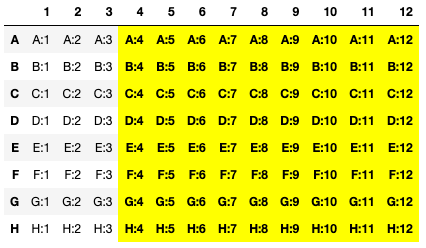
You can get a rectangular slice of the plate by using both row and column slices:
plate['A':'C', '1':'3']will return the region bound by ‘A:1’ to ‘C:3’ inclusive.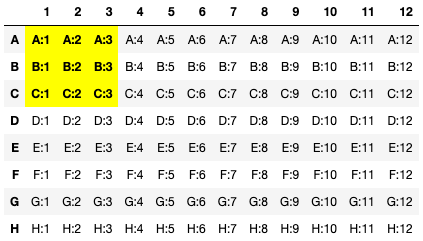
To make a rectangular slice of
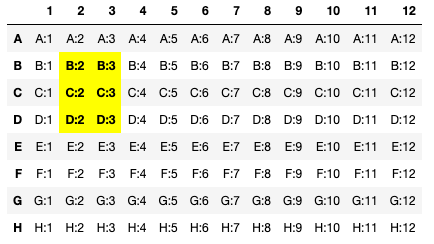
B:2toD:3, you can use:plate['B':'D', 2:3]
This will be three rows of two columns, specifically referring to
B:2,B:3,C:2,C:3,D:2, andD:3.